
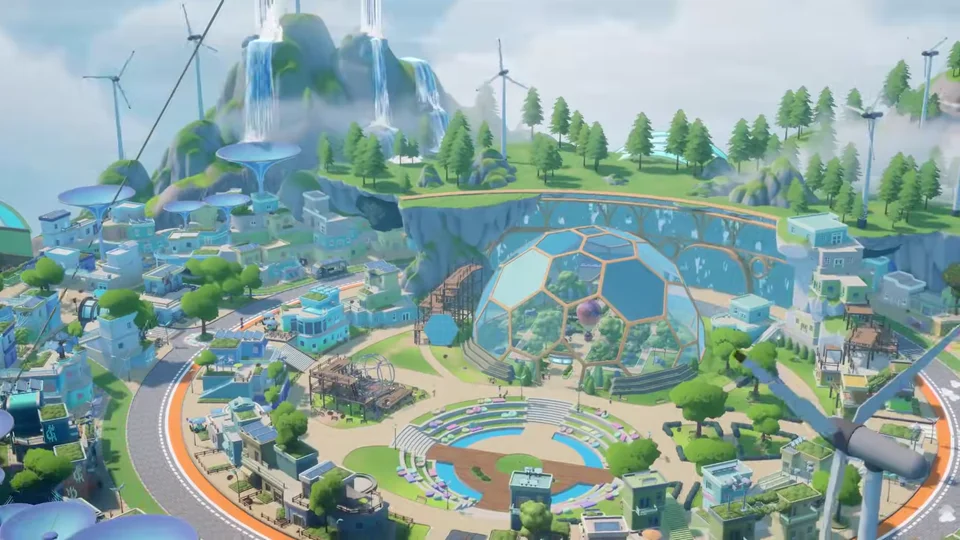
Overview of Housing and Island Customization in Loftia
Island customization in Loftia allows players to expand their floating homestead, renovate house exteriors, and design bespoke indoor layouts using the Architect Station. Renovation progression combines building permit upgrades, aesthetic island themes, and modular structural placeables to transform your sky property. Every player receives a personal sky island upon arriving in the neighborhood, providing a private haven to decorate and expand. Customizing your homestead involves three distinct game systems: architectural house remodeling, building permit expansions, and decorative furniture placement. As you earn money and Bloom through community participation, you can acquire building permits to raise placement caps across all furniture categories.
The Architect Station functions as the central terminal for previewing and applying structural alterations to your residence. Through this workbench, islanders can swap house architectural skins, connect sky bridges, and adjust residential signposts. In addition to exterior renovation, players can build functional multi-room floorplans using interior structural walls, columns, beams, and doorway arches. Together, these features provide complete creative freedom to tailor your home to your personal aesthetic vision.
Unlocking the Architect Station Through Side Quests
Access to residential renovations begins with the dedicated housing side quest titled It’s On the House. This assignment is offered by Milo and Clive in Loftia City after completing the prerequisite quest Welcome to the Gardens. The narrative introduces players to island architecture by offering an introductory renovation upgrade free of charge. Completing It’s On the House guides players through six sequential quest milestones:
- Step 1: Choose a House Improvement from Milo’s shop catalogue.
- Step 2: Talk to Milo at his Loftia City workshop to discuss architectural designs.
- Step 3: Go back to the neighborhood to visit your personal floating estate.
- Step 4: Meet Milo near the Architect Station situated outside your house.
- Step 5: Use the Architect Station to customize your house and apply your chosen renovation.
- Step 6: Talk to Milo near the Architect Station to conclude the tutorial.
Finishing the quest permanently unlocks the House Customization feature on your account. Additionally, Milo rewards you with 3 Wall items and 3 Column items to jumpstart your interior partition construction.
Expanding Your Sky Estate with Island Slots Permits
Every Loftian starts with a single sky island slot dedicated to their starter cottage and initial garden beds. To accommodate expansive farm layouts, livestock paddocks, and specialized workshops, you can unlock additional Island Slots through city building permits. Island Slots permits remove geographic constraints by tethering auxiliary floating landmasses to your primary estate.
- Starting Base Tier: 1 Island Slots landmass, which starts locked until unlocked through residential progression.
- Tier 2 permit: Increases capacity to 2 Island Slots for a permit fee of 10000 money and 10 Bloom.
- Tier 3 permit: Increases capacity to 3 Island Slots for a permit fee of 20000 money and 25 Bloom.
Acquiring 3 Island Slots allows homeowners to organize dedicated themed plateaus. For example, players frequently designate one island for industrial crafting and processing stations, a second island for automated hydroponics and orchards, and a third island for a lavish residence. Connecting auxiliary islands with sky bridges creates continuous elevated walking paths across your expanding aerial domain.
Building Permit Limits for Structural and Decorative Items
To maintain city stability and neighborhood performance, Loftia enforces placement caps across distinct item categories. Building permits purchased with money and Bloom raise these limits, allowing you to furnish complex architectural layouts without hitting restrictive placement barriers. Understanding the starting limits and upgrade thresholds ensures you allocate your civic currency efficiently.
Structural Items Permit Limits and Upgrades
Structural Items encompass architectural building blocks including interior walls, half walls, glass partitions, columns, beams, and doorway arches. The category has a base starting limit of 10 Structural Items, which starts locked until unlocked via housing progression. Reaching the maximum allowance of 30 Structural Items provides ample capacity to construct enclosed bedrooms, private study rooms, and partitioned kitchens within your house. Upgrading Structural Items capacity progresses across four permit tiers:
- Tier 1 permit upgrade: Increases allowance to 15 Structural Items for 500 money and 0 Bloom.
- Tier 2 permit upgrade: Increases allowance to 20 Structural Items for 1000 money and 0 Bloom.
- Tier 3 permit upgrade: Increases allowance to 25 Structural Items for 5000 money and 5 Bloom.
- Tier 4 permit upgrade: Increases allowance to 30 Structural Items for 10000 money and 10 Bloom.
Other Placeables Permit Limits and Upgrades
The Other Placeables category governs general decorative furniture, lighting lamps, rugs, tables, chairs, and ornamental accessories. Islanders start with an unlocked base limit of 50 Other Placeables items, providing generous initial room for basic furnishing. Expanding decorative capacity follows four progressive upgrade tiers:
- Tier 1 permit upgrade: Increases limit to 75 Other Placeables for 175 money and 0 Bloom.
- Tier 2 permit upgrade: Increases limit to 100 Other Placeables for 2500 money and 0 Bloom.
- Tier 3 permit upgrade: Increases limit to 125 Other Placeables for 5000 money and 5 Bloom.
- Tier 4 permit upgrade: Increases limit to 150 Other Placeables for 10000 money and 10 Bloom.
Mannequins and Pet Habitats Limits
Specialized interactive placeables operate under dedicated category quotas to balance animated island elements. Mannequins allow players to display collectible outfits, themed armor sets, and cosmetic clothing across their residence. The Mannequins category starts locked with an initial limit of 1 Mannequins fixture.
- Mannequins tier 1: Expands capacity to 2 Mannequins for 1000 money and 0 Bloom.
- Mannequins tier 2: Expands capacity to 3 Mannequins for 2500 money and 10 Bloom.
- Mannequins tier 3: Expands capacity to 4 Mannequins for 5000 money and 25 Bloom.
Pet Habitats house loyal companion creatures and critters on your residential grounds. This category starts locked with an initial base allowance of 1 Pet Habitats enclosure.
- Pet Habitats tier 1: Expands allowance to 2 Pet Habitats for 500 money and 0 Bloom.
- Pet Habitats tier 2: Expands allowance to 3 Pet Habitats for 2500 money and 10 Bloom.
- Pet Habitats tier 3: Expands allowance to 4 Pet Habitats for 5000 money and 25 Bloom.
Milo’s Renovation Shop Catalogue and Verdium Pricing
Milo’s Renovation Shop serves as the exclusive marketplace for acquiring exterior house themes, matching sky bridges, signposts, and interior finishes. All goods in this specialty store trade exclusively in verdium, an architectural civic token earned through community projects and housing milestones. The shop inventory expands as players increase their civic standing, offering Level 1 and Level 2 renovation suites.
Renovation Themes and Structural Materials at Level 1
Level 1 features the cozy Cottagecore architectural theme alongside structural building supplies and diverse surface finishes. Level 1 also stocks a versatile array of wallpaper patterns, ceilings, and flooring tiles priced between 0 and 10 verdium each. Popular flooring designs include Diamond Tile Flooring, Herringbone Wood Flooring, Woven Carpet Flooring, and Textured Concrete Flooring for 5 verdium each. Premium flooring styles like Plush Carpet Flooring, Checkered Tile Flooring, and Marble Tile Flooring are available for 10 verdium each. Ceiling finishes include Textured Concrete Ceiling for 5 verdium and Marble Tile Ceiling for 10 verdium:
- Cottage: Exterior house shell available for 25 verdium in single batches.
- Cottage Bridge: Arched wooden connecting bridge priced at 15 verdium in single batches.
- Cottage Sign: Rustic island wooden signpost available for 10 verdium in single batches.
- Wall: Standard interior 2-meter wall piece sold for 10 verdium per batch of 5 items.
- Half Wall: Interior 1-meter wall partition sold for 10 verdium per batch of 5 items.
- Short Wall: Low 2-meter waist-height partition sold for 10 verdium per batch of 5 items.
- Glass Wall: Transparent interior glass divider sold for 10 verdium per batch of 5 items.
- Column: Vertical support pillar sold for 10 verdium per batch of 5 items.
- Beam: Overhead horizontal ceiling timber sold for 10 verdium per batch of 5 items.
- Arch: Interior 2-meter doorway arch sold for 10 verdium per batch of 5 items.
- Wide Arch: Expansive 4-meter archway partition sold for 10 verdium per batch of 5 items.
Solarpunk Theme and Autumn Island at Level 2
Level 2 unlocks advanced architectural styles inspired by futuristic ecological design and seasonal landscapes. Homeowners can remodel their estate with themed structures and matching bridges:
- Autumn Island: A picturesque seasonal island biome complete with golden foliage, priced at 75 verdium in single batches.
- Solarpunk House: A sleek futuristic eco-residence adorned with integrated solar glass and clean lines, priced at 50 verdium.
- Solarpunk Bridge: An arched metallic sky bridge featuring luminous green accents, available for 25 verdium in single batches.
- Solarpunk Sign: A high-tech directional signpost displaying glowing indicators, available for 15 verdium in single batches.
Structural Building Techniques and Interior Architecture
Mastering interior architecture in Loftia transforms hollow cottage shells into realistic homes with defined living spaces. By combining walls, half walls, glass dividers, columns, and doorway arches, players can establish natural architectural flow without crowding small rooms. Here are practical design techniques to maximize structural efficiency on your residential plot:
- Room Partitioning with Standard Walls: Use the 2-meter Wall to erect complete privacy partitions for bedrooms, bathrooms, and private craft studios.
- Open-Concept Living with Half Walls: Deploy Half Wall and Short Wall dividers between dining and kitchen zones to preserve open sightlines while establishing functional boundaries.
- Sunrooms and Conservatories: Integrate Glass Wall panels along outer-facing perimeters to let sunlight flood indoor botanical conservatories and reading nooks.
- Structural Realism with Columns: Position Column pillars at wall intersections and corner joints to create authentic load-bearing visual aesthetics.
- Overhead Division with Beams: Suspend Beam pieces across high ceilings to separate open floor plans without sacrificing valuable floor tile space.
- Doorway Transitions with Arches: Install Arch for standard interior doorways and Wide Arch for grand entrances leading into central parlors or garden verandas.
Decorating with Mannequins, Pet Habitats, and Displays
Beyond structural dividers, interactive fixtures infuse personality into your floating residence. Mannequins provide an ideal method for exhibiting seasonal festival attire, quest rewards, and crafted tailoring sets. Arranging mannequins inside dedicated dressing rooms or walk-in closets creates immersive roleplay quarters. Meanwhile, Pet Habitats establish welcoming outdoor enclosures where adopted companions can rest and play. Placing pet beds, feeding bowls, and scratch posts near habitats enlivens your homestead with charming creature animations.
Housing Limits and Renovation Reference Table
The table below details starting limits, permit upgrade costs, and key renovation milestones across all housing categories in Loftia. Planning permit investments early allows homeowners to expand their island layout efficiently.
| Permit Category | Starting Limit | Maximum Limit | Total Upgrade Cost |
|---|---|---|---|
| Island Slots | 1 (locked) | 3 Slots | 30,000 Dew + 35 Bloom |
| Structural Items | 10 (locked) | 30 Items | 16,500 Dew + 15 Bloom |
| Other Placeables | 50 (unlocked) | 150 Items | 17,675 Dew + 15 Bloom |
| Mannequins | 1 (locked) | 4 Mannequins | 8,500 Dew + 35 Bloom |
| Pet Habitats | 1 (locked) | 4 Habitats | 8,000 Dew + 35 Bloom |
| Energy Stations | 1 (unlocked) | 5 Stations | 8,625 Dew + 15 Bloom |
| Garden Beds | 1 (unlocked) | 6 Beds | 20,525 Dew + 35 Bloom |
| Hydrofarms | 1 (locked) | 5 Stations | 37,500 Dew + 85 Bloom |